Tuesday, March 25, 2014

Oracle SOA/BPEL - When to use throw/catch events and send/receive tasks

The following table is a quick guide to which kind of inter-process communication mechanism you should use in various circumstances:
Throw/catch message events
Throw/catch signal events
Send/receive tasks
Ability to attach a boundary event to catch errors
No
No
Yes
Asynchronous
Either
Yes
Yes
Invoked process becomes a ...
Child
Child
Peer
The process you want to invoke starts with a ...
Catch message event or receive task that creates an instance
Catch signal event
Receive task
You know who the receiver is at design time
Yes
No
Yes
You want to send the 'message' to ... receivers
One
Any number
One
Failure of called process propagates to calling process*

Thursday, February 27, 2014

Oracle SOA - OWSM- Task Query Service with SAML Port and Credential Store

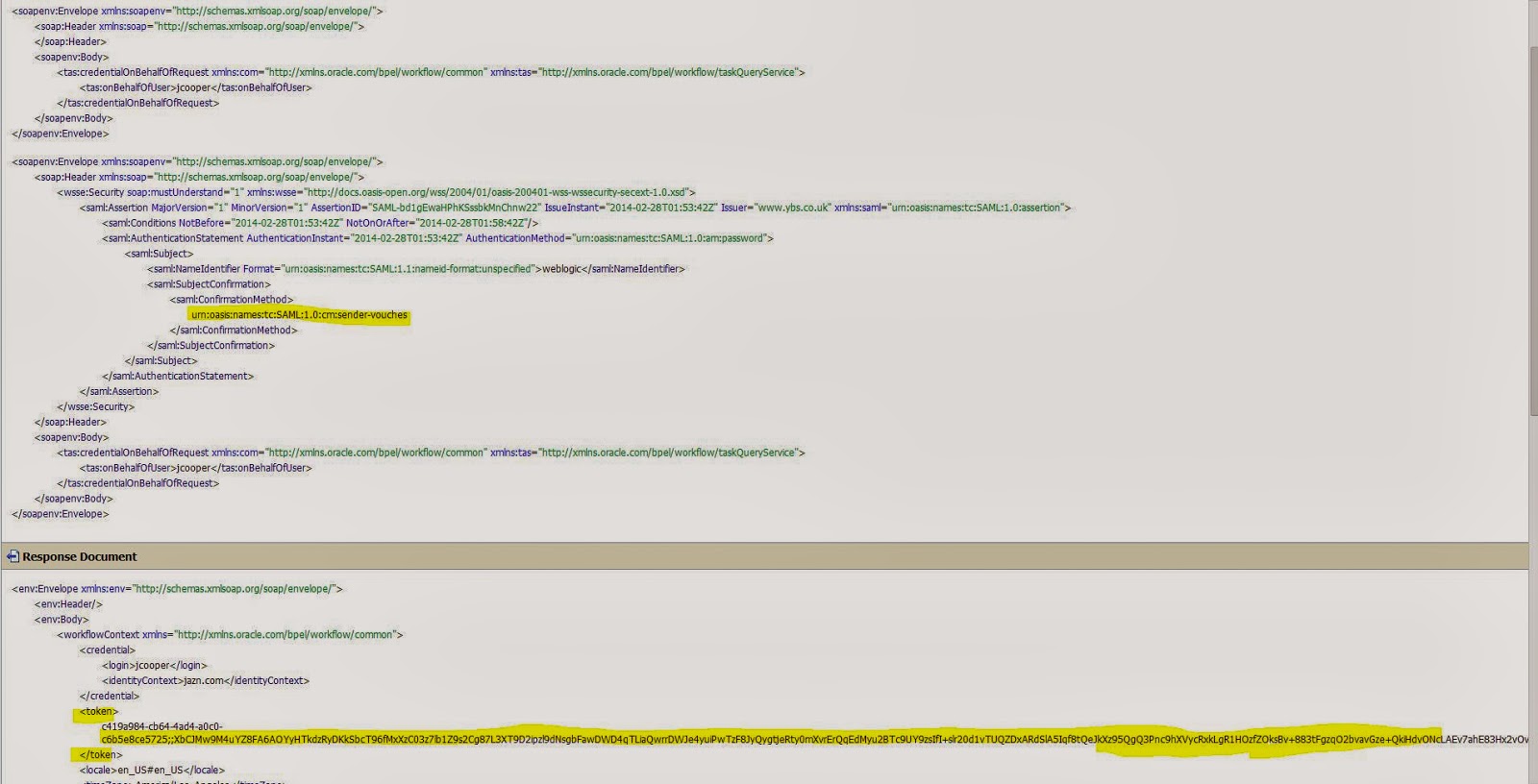
Scenario:  - Invoke task query service securely by using wss10_saml_token_client_policy OWSM policy and CSF key. Without inbound subject(Principal) 


Solution:

You can find sample BPEL project on Task Query service using SAML on  Jeroren Bakker's blog .This blog based  on policy's default setting like "subject.precedence" = true which means policy expect subject (Principal) from inbound.

You can use same project but with following settings.


BPEL


.  1. Create  "basic.credentials" CSF key in EM console 


 2.     Apply   wss10_saml_token_client_policy on Task Query Service in BPEL Process


Edit policy properties.
·        If there is other issuer than oracle override the value of “saml.issuer.name” property.
·        Override value of “subject.precedence” to false.


SAML client policy having default "basic.credential" csf key value.


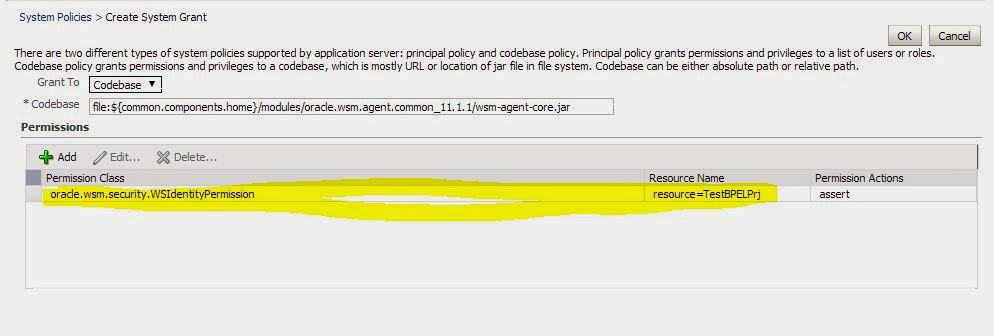
   3. If we are using "subject.precendece" option as false, it means we are not using or expecting any inbound subject and we are going to use CSF key to generate SAML token. To accomplish this opertation, we have to give WSIdentityPermission to our SOA project. In my case ,composite name is TaskQuery_Process.

     Set the WSIdentityPermissio

  •  In the navigator pane, expand WebLogic Domain to show the domain where you need to configure the application. Select the domain.
  • Using Fusion Middleware Control, click WebLogic Domain, then Security, and then System Policies. System policies are the  system-wide policies applied to all applications deployed to the current WebLogic Domain. 


  •     From the System Policies page, select the arrow icon in the Permission field to search the system security grants
  •   Select one of the codebase permissions to use as a starting point and click Create Like. 

  •   In the Grant Details section of the page, enter file:${common.components.home}/modules/oracle.wsm.agent.common_11.1.1/wsm-agent-core.jar in the Codebase field.
  •    In the Permissions section of the page, select the starting point permission class and click Edit.
  •       Enter oracle.wsm.security.WSIdentityPermission in the Permission Class field. The resource name is the composite name for SOA, and the application name for a J2EE client. The action is always assert. 


Restart your SOA server.

After restart you can test you task query service from BPEL by using SAML port.

OSB
 - We have to perform same configuration for OSB business service.


-         Set “subject.precedence” value to false.
                                  -     Override "saml-issuer-name" property if its other than oracle.

OSB Request- Remove  "workflowContext" element from the request.

TaskQuery Service Method - authenticateOnBehalfOf


Friday, January 10, 2014

Oracle SOA/BPM - Create Application Role from SQL Authenticator in EM Console

This blog is third series of my previous blogs related to SQL Authenticator
SQL Authenticator -1
SQL Authenticator-2
I was facing some issues while creating application role in EM console from DB based Authentication provider.

select soa-infra -> security -> application roles


Click on add button


Choose user as Type and put  some principal name


You will see following error because it would not work for custom authenticators.You have to choose advance option

ERROR
=============
Failed to retrieve users.
Operations error: entity= op=search mesg=Protocol Error LDAP Error 2 : %HOST%:389


Select type as User or Group and enter name of user or group which is present in Database tables


Click OK and put some info in next screen for display and description fields


Click OK and you can seen new application role present in following screen. 


Now you can see these roles in human task activity in JDeveloper


Friday, December 20, 2013

Oracle BPM Case Management - Not able to assign case id from start case output

Problem Desc:

This is oracle product issue. When your are creating xslt mapping for case-output variable, it is uses http://xmlns.oracle.com/CaseService/types name space but actual response namespace is different  http://xmlns.oracle.com/bpm/CaseService/types . Due to this namespace issue, we can't assign value from case output variable.

Solution: 

You have to replace   this namespace

http://xmlns.oracle.com/CaseService/types

with


in you xslt.

That's it. 

It will work.

Cannot read from policy store. Reason is PolicyStore Error, javax.xml.stream.XMLStreamException

This error comes when system-jazn-data.xml file is corrupted.

<20-Dec-2013 10:50:35 o'clock GMT> <Critical> <WebLogicServer> <BEA-000386> <Server subsystem failed. Reason: weblogic.security.SecurityInitializationException: The loading of OPSS java security policy provider failed due to exception, see the exception stack trace or the server log file for root cause. If still see no obvious cause, enable the debug flag -Djava.security.debug=jpspolicy to get more information. Error message: Cannot read from policy store. Reason is PolicyStore Error, javax.xml.stream.XMLStreamException: javax.xml.stream.XMLStreamException: Premature end of file encountered
weblogic.security.SecurityInitializationException: The loading of OPSS java security policy provider failed due to exception, see the exception stack trace or the server log file for root cause. If still see no obvious cause, enable the debug flag -Djava.security.debug=jpspolicy to get more information. Error message: Cannot read from policy store. Reason is PolicyStore Error, javax.xml.stream.XMLStreamException: javax.xml.stream.XMLStreamException: Premature end of file encountered
                at weblogic.security.service.CommonSecurityServiceManagerDelegateImpl.loadOPSSPolicy(CommonSecurityServiceManagerDelegateImpl.java:1402)
                at weblogic.security.service.CommonSecurityServiceManagerDelegateImpl.initialize(CommonSecurityServiceManagerDelegateImpl.java:1022) 


Solution:

Just need to replace this file with new one which you can get from other soa domains or any backup if you have.

Thursday, December 12, 2013

Error in starting cases - : java.util.MissingResourceException: Can't find resource for bundle

Some time starting i case i was following exception again and again. I googled it but did not find any solutiuon for this.

Error in starting cases.
Contact system administrator for assistance.

    at oracle.bpm.casemgmt.impl.CaseInstanceServiceImpl.startCase(CaseInstanceServiceImpl.java:169)


Caused by: java.util.MissingResourceException: Can't find resource for bundle java.util.PropertyResourceBundle, key

Due to this exception case manager is not triggered and not returning any case ID


Then i try following options and it worked.

1. Go to your project folder  <Your Project>\SCA-INF\classes
2.  Delete everying thin in this folder
3. Go to  <Your Project>\resources and delete everything from this folder
4. Redeploy your project again

You would not see this problem again.


Friday, November 22, 2013

Oracle BPM 11g Case Management - Case API - jcooper(User) don't have access to case for case id

 jcooper(User)  don't access to case for case id

I have deployed the case manager project and triggered  one instance of it. Then i was trying get case details using case management api but i was getting above error for every user i was trying.

User should have  READ and UPDATE access for cases he is trying to access which we can check in EM console

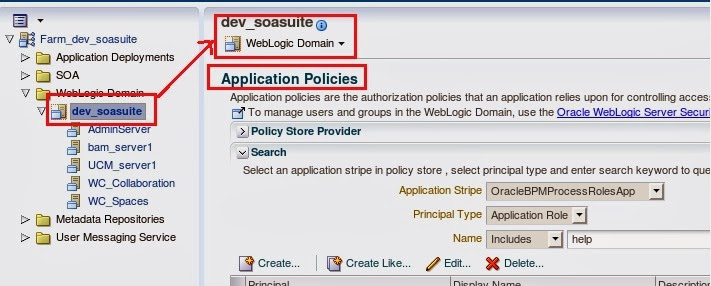
Click on "Weblogic domain" -> SOA Domain

From top of SOA domain click on application policies


You can see following policies for Stakeholders you defined in case manager


But some time if we don't see these policies and get the error mentioned above(user don't have access)


It means we have update issue  with system-jazn-data.xml  file.

Sol:

Go to the following location of the file
Linux:

/oracle/fmwhome/user_projects/domains/dev_soa_osb/config/fmwconfig

Windows:

C:\Oracle\Middleware\user_projects\domains\bpm_domain\config\fmwconfig

Right click on the file system-jazn-data.xml and select properties and change permission from read-only to none

Linux
Go to Permissions tab and change the permission for Group access and other access to “None”

It will solve you problem.