Showing posts with label Case Managemnet. Show all posts

Friday, December 20, 2013

Oracle BPM Case Management - Not able to assign case id from start case output

Problem Desc:

This is oracle product issue. When your are creating xslt mapping for case-output variable, it is uses http://xmlns.oracle.com/CaseService/types name space but actual response namespace is different  http://xmlns.oracle.com/bpm/CaseService/types . Due to this namespace issue, we can't assign value from case output variable.

Solution: 

You have to replace   this namespace

http://xmlns.oracle.com/CaseService/types

with


in you xslt.

That's it. 

It will work.

Thursday, December 12, 2013

Error in starting cases - : java.util.MissingResourceException: Can't find resource for bundle

Some time starting i case i was following exception again and again. I googled it but did not find any solutiuon for this.

Error in starting cases.
Contact system administrator for assistance.

    at oracle.bpm.casemgmt.impl.CaseInstanceServiceImpl.startCase(CaseInstanceServiceImpl.java:169)


Caused by: java.util.MissingResourceException: Can't find resource for bundle java.util.PropertyResourceBundle, key

Due to this exception case manager is not triggered and not returning any case ID


Then i try following options and it worked.

1. Go to your project folder  <Your Project>\SCA-INF\classes
2.  Delete everying thin in this folder
3. Go to  <Your Project>\resources and delete everything from this folder
4. Redeploy your project again

You would not see this problem again.


Friday, November 22, 2013

Oracle BPM 11g Case Management - Case API - jcooper(User) don't have access to case for case id

 jcooper(User)  don't access to case for case id

I have deployed the case manager project and triggered  one instance of it. Then i was trying get case details using case management api but i was getting above error for every user i was trying.

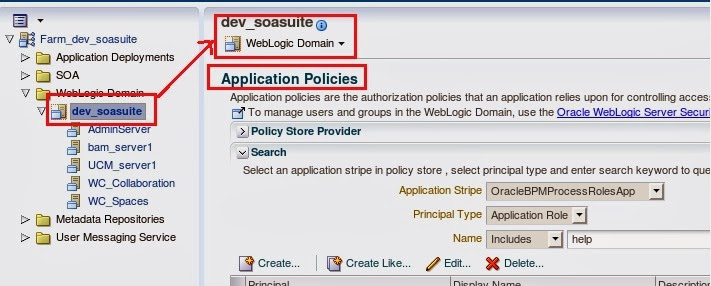
User should have  READ and UPDATE access for cases he is trying to access which we can check in EM console

Click on "Weblogic domain" -> SOA Domain

From top of SOA domain click on application policies


You can see following policies for Stakeholders you defined in case manager


But some time if we don't see these policies and get the error mentioned above(user don't have access)


It means we have update issue  with system-jazn-data.xml  file.

Sol:

Go to the following location of the file
Linux:

/oracle/fmwhome/user_projects/domains/dev_soa_osb/config/fmwconfig

Windows:

C:\Oracle\Middleware\user_projects\domains\bpm_domain\config\fmwconfig

Right click on the file system-jazn-data.xml and select properties and change permission from read-only to none

Linux
Go to Permissions tab and change the permission for Group access and other access to “None”

It will solve you problem.

BPM 11g Case Management: Could not find records in table using query select count(caseInstance) from Case as caseInstance

Caused By: BPM-73004

Unable to find records in table.
Could not find records in table using query select count(caseInstance) from Case as caseInstance join caseInstance.caseHeader as caseHeader join caseInstance.caseTranslations as caseTranslations where ( caseTranslations.locale = :locale ) and exists (select caseStakeHolders from caseInstance.caseStakeHolders as caseStakeHolders join caseStakeHolders.caseStakeHolderMembers as caseStakeHolderMembers where ((caseStakeHolderMembers.stakeHolder = :stakeHolder and caseStakeHolderMembers.stakeHolderType = 'USER') or (caseStakeHolderMembers.stakeHolder IN :stakeHolderAppRoleList and caseStakeHolderMembers.stakeHolderType = 'APPLICATION_ROLE') or (caseStakeHolderMembers.stakeHolder IN :stakeHolderGroupList and caseStakeHolderMembers.stakeHolderType = 'GROUP'))) order by caseInstance.caseHeader.caseNumber desc .
Contact system administrator for assistance.


You can also find this error when you try get list of Cases from from the case manager

Solution:


  • Download the patch for 14791221
  • Unzip the patch in a temporary directory
  • Copy patch-catalog_18499.xml and HLJ3.jar to  utils/bsu/cache_dir under your BEA Home. For e.g. this will be /oracle/fmwhome/utils/bsu/cache_dir in the BPM VirtualBox image
  • Change directory to /oracle/fmwhome/utils/bsu
  • Run ./bsu.sh
  • This will launch the Smart Update application. Once it initializes, you should see the patch in the Downloaded Patches panel. Click on the button in the Apply column to apply the patch
  Restart all the servers.